
Direct Answer
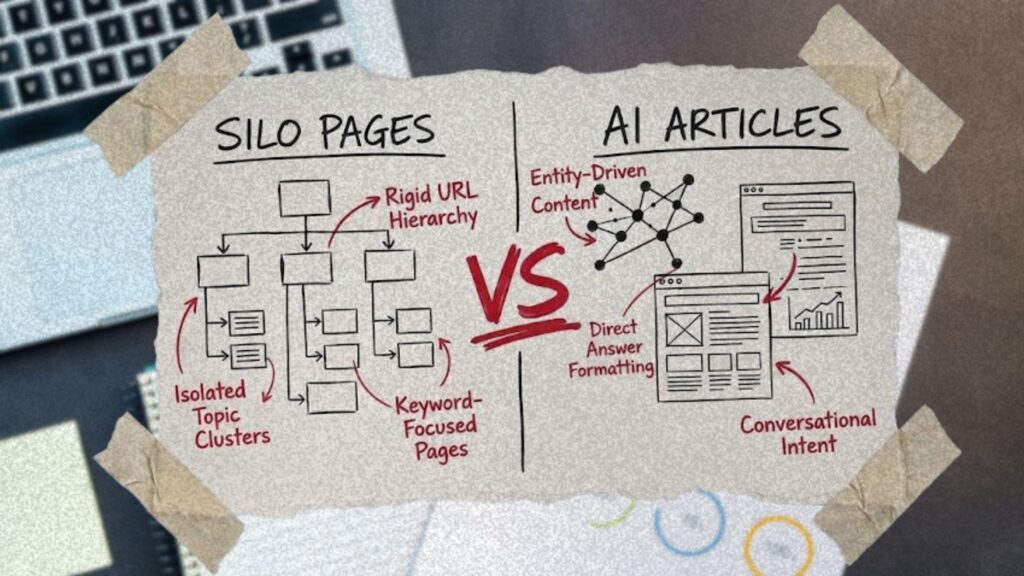
Silo pages and articles built for artificial intelligence (AI) search do different jobs, and trades need both. Silo pages sell each service and area. AI-optimized articles answer the questions homeowners ask before they call. Google reads the links between pages, not web address (URL) folders, so link the two both ways.
TL;DR
- Silo pages are your services hub, service pages and real service area pages, linked together. They sell the job to someone ready to book.
- AI-optimized articles answer one homeowner question fast, using your own jobs and numbers. Google’s AI features run on the same ranking and quality systems as regular Search.
- Google generally doesn’t use URL structure to work out how a site fits together. It reads the links between pages, so a trades site doesn’t need a URL rebuild into silo folders.
- Link every article to the service page it supports, and every service page back to its articles. Google lists internal links among the basics for AI Overviews and AI Mode.
- Skip cloned city pages, mass AI posts, chunking and llms.txt files. Google’s spam policies and AI guide cover all four.
- Check results monthly in Search Console, Bing Webmaster Tools and Google Analytics, then match them to calls and bookings.
One liner: Keep your silo pages, add articles built from real jobs, and link the two both ways, with no URL rebuild needed.
Key Numbers
| Stat | What it measures | Source |
|---|---|---|
| More than a few thousand URLs | Site size at which Google says grouping pages in folders can affect crawling | Google Search Central Starter Guide |
| 0 additional requirements | Extra technical requirements to appear in AI Overviews or AI Mode | Google, AI features and your website |
| May 15, 2026 | Google adds its guide to optimizing for generative AI features on Search | Google Search documentation updates |
| June 15, 2026 | Google adds a note that llms.txt files aren’t needed for Google Search | Google Search documentation updates |
| March 5, 2024 | Google adds the scaled content abuse spam policy | Google Search documentation updates |
| February 10, 2026 | Bing Webmaster Tools opens its AI Performance report in public preview | Bing Webmaster Blog |
| 20 to 30 minutes | Length of a Marvel Marketing intro call | Marvel Marketing intro call page |
| 3 offices | Marvel Marketing locations in Calgary, Toronto and Vancouver | marvelmarketing.ca |
Silo Pages Run on Links, Not URL Folders
In short: Google works out how a site fits together from the links between pages, not from URL folders. For a trades site, silo pages work when service pages and articles link to each other, and that doesn’t take a URL rebuild.
Silo pages don’t need URL folders to work. In its guidance on site structure, Google says it generally doesn’t look at URL structure to work out how a site is organized, and that it reads the links between pages instead.
The classic search engine optimization (SEO) silo structure usually gets sold with two rules. Put every page in a folder, such as /plumbing/drain-cleaning/, and never link from one silo to another. Here’s how those rules compare with Google’s own documentation.
| Silo rule you’ll hear | What Google’s documentation says |
|---|---|
| Put pages in URL folders so Google sees the silo | Google generally doesn’t use URL structure to work out site structure. It reads the links between pages |
| Never link across silos | Internal links are one of the basics for showing up in AI Overviews and AI Mode |
| Reorganize the site now | Search engines will likely understand your pages as they are, however the site is organized |
Google’s SEO Starter Guide does mention folders, but with a size limit. It says grouping pages in folders can affect crawling on sites with more than a few thousand URLs, mainly by helping Google learn how often each folder changes. A plumbing company with 40 pages is nowhere near that line.
Picture that 40-page Calgary plumber getting a quote to move every page into silo folders. Every old URL needs a redirect and every internal link needs updating, and the site gains nothing Google’s guide asks for. The budget is better spent on the pages and links that do the work.
The no-cross-linking rule works against AI search. Google lists internal links among the SEO basics for AI Overviews and AI Mode, and a website silo structure that walls articles off from service pages cuts exactly those links. The fix is plain: every article links to the service page it supports, and every service page links to the articles that answer its customers’ questions.
What Are Silo Pages on a Trades Website?
In short: Silo pages are the service side of your site: a hub page, one page per service, and a page for each area you work in. They tell Google, AI tools and homeowners what you do and where you do it, but they can’t answer every question a homeowner asks before calling.
Silo pages are the pages that group one line of work on your website. That means a hub page for the service category, one page for each job you sell, and a page for each area you actually serve, all linked together. They tell search engines and homeowners what you do and where you do it.
For a Calgary heating, ventilation and air conditioning (HVAC) company, one silo might look like this.
| Page type | Its job | Calgary HVAC example |
|---|---|---|
| Services hub | Lists every service and links to each one | Heating and cooling services |
| Service page | Sells one job and covers the basics: what, where, how to book | Furnace repair |
| Service area page | Shows real work in a real area | Airdrie furnace and air conditioning (AC) service |
The hub is what SEO people call a pillar page. The pages under it form a topic cluster, a set of pages on one subject that link to each other. When the group is done well, it shows topical authority. In plain terms, your site covers heating and cooling properly instead of in one thin page.
Silo pages have limits. A service page sells one job. It shouldn’t carry a 1,500-word explainer on why a furnace short-cycles, because a homeowner who’s ready to book doesn’t want to scroll past it. Adding more pages doesn’t fix a thin silo either. Google says a high number of pages doesn’t make a site higher quality or more relevant to users. Ten neighbourhood pages with the same copy add pages, not value.
The questions homeowners ask before they call need a different kind of page: what a new furnace costs, whether to repair or replace, what a banging noise means. That’s where AI-optimized articles come in. You can see how this structure applies across HVAC, plumbing, roofing and electrical in our marketing for home service trades.
What Makes an Article AI-Optimized
In short: An AI-optimized article answers one homeowner question fast, using your own jobs, numbers and photos. It’s still an SEO article, because Google’s AI features run on the same ranking and quality systems as regular Search.
AI-optimized content is an article built to be the best answer to one question a homeowner asks before they call. Google’s AI features are rooted in its core Search ranking and quality systems. So a good AI-optimized article is a well-made SEO article, not a special format.
What Google asks for is specific. Write from what you know and the experience you bring, and don’t recycle what’s already online or what a generative AI tool could easily produce. Google calls this non-commodity content. It also suggests backing the text with high-quality images and video where they help.
Here’s the difference on a post about furnace replacement cost in Calgary.
| Generic AI-written post | AI-optimized post |
|---|---|
| Opens with national averages and a list of “factors that affect cost” | Opens with the shop’s own installed price range for Calgary homes |
| Could be about any city | Names what moved the price on recent jobs, such as venting changes or an attic furnace |
| Stock photos | Photos of the shop’s own installs |
| No link to a service page | Links to the furnace installation page so a ready buyer can book |
An AI-optimized article usually has four things:
- The answer in the first line or two under each heading.
- Your own numbers, such as prices, timelines, and how often a part fails on the jobs you see.
- One real job story, told plainly.
- A link to the service page that sells the work.
AI can help with the draft. Google says generative AI is useful for research and for adding structure to original content. Its output can contain inaccuracies, though, so Google says to fact-check it by hand before it goes live. If you’d rather hand the writing off, our SEO content writing team does that work.
Silo Pages vs AI-Optimized Articles at a Glance
In short: Silo pages sell a service to someone ready to book. AI-optimized articles answer the questions people ask while they’re still deciding. Each one links to the other.
The two page types do different jobs for the same customer at different moments. Google describes AI Mode as most useful for questions that need more exploring, reasoning or comparing. That’s the research stage, and it’s where articles work. Silo pages take over when the homeowner is ready to call.
| Attribute | Silo pages | AI-optimized articles |
|---|---|---|
| Main job | Sell one service in one area | Answer one question before the call |
| Typical search | furnace repair Calgary | how much is a new furnace in Calgary |
| Reader stage | Ready to book | Still researching |
| Must include | Service, area, hours, proof and a way to book | A fast answer, your own numbers and a job story |
| Links to | The articles that answer its customers’ questions | The service page that sells the work |
| What to measure | Calls, forms and bookings | Impressions, clicks and citations in AI answers |
If you’re choosing where to start, start with the service pages. Every article ends by sending a ready buyer somewhere, and that somewhere has to exist first. A shop with solid furnace, AC and heat pump pages can then add articles one question at a time, each one linked to the page it supports.
The two page types aren’t rivals. The real SEO vs AEO (answer engine optimization) question for a trades shop is whether its silo pages and articles are linked tightly enough to work as one system.
How AI Search Picks Pages to Cite
In short: Google’s AI features can break one question into several related searches, then cite the pages that answer each part. A page only needs to be indexed and eligible for a snippet to be considered, so a site with linked service pages and articles gets more chances to be picked.
When a homeowner asks AI Overviews or AI Mode a question, Google may use what it calls query fan-out. That means running several related searches across subtopics and sources to build one answer. The answer then links to the pages that helped.
Take one question a Calgary homeowner might type into AI Mode: “Should I repair or replace a 15-year-old furnace?” The searches behind the answer could split like this.
| Sub-search the AI might run | Page that can answer it |
|---|---|
| how long furnaces last | Article: repair or replace |
| new furnace cost Calgary | Article: furnace replacement cost |
| furnace replacement Calgary | Service page: furnace installation |
| furnace companies near me | Google Business Profile plus the service page |
Service pages and a Business Profile cover the last two rows. Articles cover the first two, but on their own they have nowhere to send a homeowner who’s ready to book. A shop with both, linked together, covers the whole question.
The entry rule is short. Google says a page must be indexed and eligible to show with a snippet, and there are no additional technical requirements for AI Overviews or AI Mode. For local questions, Google adds that a Business Profile helps businesses show up in AI responses.
ChatGPT works on similar lines. OpenAI says ChatGPT typically rewrites a question into one or more targeted searches before it answers. The ChatGPT side, including the crawler settings, is covered in our guide to getting recommended by ChatGPT.
What Not to Do: City Page Clones, Mass AI Pages and Chunking
In short: Three shortcuts get sold as silo pages or AI-optimized content. Google’s spam policies cover the first two, and its AI guide says the third isn’t needed.
Each of these runs into Google’s own rules.
| Shortcut | What Google says | Do this instead |
|---|---|---|
| Cloned city pages with the town name swapped | Pages targeted at specific regions or cities that funnel users to one page are doorway abuse | One page per area you actually serve, with local jobs and photos |
| Hundreds of AI-written posts | Using generative AI to make many pages without adding value for users is scaled content abuse | Fewer articles, each built on your own jobs and fact-checked |
| Chunking articles and adding llms.txt | There’s no requirement to break content into tiny pieces, and Google Search ignores llms.txt files | Clear headings with the answer up top, written for the reader |
City pages matter most for trades, because almost every shop serves more than one town. A page for every town within 100 km, with the same copy and only the name swapped, matches Google’s description of doorway abuse. A real area page shows work in that area: the jobs you did there, local photos, and the crew that covers it. Our guide to SEO for contractors in Canada walks through service area pages that stay inside the rules.
Mass AI posts fall under scaled content abuse when they’re made without adding value for users. Run each article through the four-point list above before it goes live.
Chunking and llms.txt files are the newest pitch. Google says there’s no requirement to break content into tiny pieces for AI, and that Google Search ignores llms.txt files. It tells site owners to put SEO best practices ahead of “AEO/GEO hacks,” where GEO stands for generative engine optimization. Good answer engine optimization builds on that SEO work.
How to Link Silo Pages and AI-Optimized Articles
In short: Match every customer question to the service page it supports, then link the two in both directions. Google lists internal links among the basics for its AI features, and they don’t take a new website to fix.
You don’t need a rebuild to do this. A list, a spreadsheet and a few hours with your team will get it done.
- List every service you sell and every area your crews actually cover. Each one gets its own page.
- Collect 10 to 20 questions from calls, quotes and techs in the field. Your dispatcher likely hears most of them every week.
- Match each question to the service page it supports.
- Write one article per question, and link it to that service page with words that describe the page.
- Add a short “Common questions” block to each service page that links back to its articles.
- Put the hub and your top service pages in the main menu, link the hub to every service page, and link each service page back to the hub. Google uses menus and links between pages, including how many links point to a page and how many clicks it takes to reach it, to judge how important each page is.
- Make sure no page is orphaned, meaning every page can be reached through a link from another page.
Here’s what the map looks like for three Calgary HVAC articles.
| Article | Links to service page | Service page links back with |
|---|---|---|
| Furnace replacement cost in Calgary | Furnace installation | What a new furnace costs |
| Repair or replace a 15-year-old furnace | Furnace repair | Repair or replace? |
| Is a heat pump worth it in Alberta? | Heat pump installation | Heat pumps in Alberta winters |
Anchor text matters on both sides. “What a new furnace costs” tells a reader and a search engine what’s behind the link. “Click here” tells them nothing. Twelve good questions from step 2 also give you a year of monthly articles, so this list doubles as your SEO content strategy.
If you’d like this mapped and built for you, our HVAC marketing team handles both sides: the service pages and the articles that feed them.
How to Tell It’s Working
Check four places once a month.
| Where | What it shows |
|---|---|
| Search Console Performance report, Web search type | Clicks and impressions, including from AI Overviews and AI Mode |
| Search Console Generative AI performance report | How your content performs in Google’s generative AI features |
| Bing Webmaster Tools AI Performance report | Which of your pages get cited in Microsoft Copilot and Bing’s AI answers |
| Google Analytics, filtered to utm_source=chatgpt.com | Visits from ChatGPT answers |
Then match the numbers to the phone. Log calls and bookings against the page that drew them. An article that gets cited but rarely sends visits to its service page needs a stronger link to that page.
Get Your Silo Pages and Articles Working Together
In short: Keep your silo pages, add articles that answer real customer questions, and link the two both ways. You don’t need to rebuild your URLs to do it.
Here’s a check you can run tonight. Open your best-selling service page and count two things:
- How many articles link to it.
- How many articles it links to.
If either number is zero, that page is your first fix.
From there the work is steady. Keep one page per service and per real area. Answer one customer question a month with an article built from your own jobs. Link each article to its service page and back again. Google reads those links to understand how your site fits together.
Marvel works with trades from offices in Calgary, Toronto and Vancouver, and this is the work our Calgary SEO service covers. If you’d like a second set of eyes, book an intro call with one of our partners. Set aside 20 to 30 minutes. If we’re not the right fit, we’ll give you a referral to someone who is.
Frequently Asked Questions
In short: Quick answers to what trades owners ask most about silo pages, AI-optimized articles and AI search.
Are silo pages still worth building in 2026?
Yes. Service and area pages are how your site shows what you sell and where, and Google’s AI features draw on the same Search index and ranking systems as regular results. What changed is how they work: through links to and from your articles, not URL folders.
Do I need to change my URLs to build an SEO silo structure?
No. Google says it generally doesn’t use URL structure to work out how a site is organized, and reads the links between pages instead. Its SEO Starter Guide ties folder grouping to crawling on sites with more than a few thousand URLs.
Should my articles link to pages in other silos?
Yes, when the link helps the reader. A heat pump article can link to both your heating and cooling pages. Google lists internal links that make content easy to find among the basics for AI Overviews and AI Mode.
What’s the difference between SEO and AEO?
AEO, or answer engine optimization, is SEO work aimed at showing up in AI answers. Google says the best practices for SEO stay relevant for its generative AI features, because those features are rooted in its core ranking systems.
Do I need llms.txt or special markup for AI search?
Not for Google. Google says you don’t need new machine-readable files or markup to appear in its AI features, and that Google Search ignores llms.txt files. There’s also no special schema.org structured data to add.
Do internal links pass authority between silo pages?
They tell Google which pages matter most. Google says that as a general rule, the more links a page has from within a site, the higher its importance compared with other pages on that site. Link your best-selling service pages from the homepage, menus and related articles.
How many articles should a trades company publish?
Google doesn’t set a number, and it says a high number of pages doesn’t make a site higher quality or more relevant to users. Start with the 10 to 20 questions your customers ask most, one article each, linked to the matching service page.
Definition Bank
| Term | Meaning |
|---|---|
| Silo pages | The pages that group one line of work on a site: a hub page, one page per service and one per real service area, linked together. |
| SEO silo structure | A way of organizing a site into topic groups. Google reads the links between pages, not URL folders, to work out site structure. |
| Physical silo | A silo built with URL folders, such as /plumbing/drain-cleaning/. Folder grouping can affect crawling on sites with more than a few thousand URLs. |
| Pillar page | A hub page that covers a service category and links to every page under it. |
| Topic cluster | A set of pages on one subject that link to each other, usually a pillar page plus supporting pages. |
| Topical authority | How fully and well a site covers a subject across its pages, as opposed to one thin page. |
| Service area page | A page for one area a business actually serves, showing real local jobs, photos and crew. |
| AI-optimized article | An article built to be the best answer to one customer question, written from first-hand experience and linked to a service page. |
| Non-commodity content | Google’s term for content based on real knowledge and experience, not what’s already online or easy for AI to produce. |
| Query fan-out | When Google’s AI features run several related searches across subtopics and sources to build one answer. |
| AI Overviews | Google’s AI summaries at the top of some search results, with links to supporting pages. |
| AI Mode | Google’s AI search experience for questions that need more exploring, reasoning or comparing. |
| Doorway abuse | Google’s spam policy on pages built to rank for similar searches, including pages aimed at cities that funnel users to one page. |
| Scaled content abuse | Google’s spam policy on making many pages without adding value for users, including with generative AI. |
| llms.txt | A text file some sites add for AI tools. Google Search ignores it. |
| Orphan page | A page that no other page on the site links to. |
| Anchor text | The clickable words of a link, which tell readers and search engines what’s on the other side. |
| AEO (answer engine optimization) | SEO work aimed at showing up in AI answers. |
| GEO (generative engine optimization) | Another name for optimizing content to appear in generative AI answers. |
Entity Cards
Google AI Overviews and AI Mode
| Property | Value |
|---|---|
| Operator | |
| Built on | Core Search ranking and quality systems and the Search index |
| Entry rule | Indexed and eligible to show with a snippet, no additional technical requirements |
| How answers are built | May use query fan-out across subtopics and sources |
| Source | Google, AI features and your website, Google, generative AI features guide |
Google SEO Starter Guide on site organization
| Property | Value |
|---|---|
| Publisher | Google Search Central |
| Folder grouping | Can affect crawling on sites with more than a few thousand URLs |
| Smaller sites | Search engines will likely understand pages as they are, however the site is organized |
| Source | Google Search Central Starter Guide |
Google spam policies
| Property | Value |
|---|---|
| Publisher | Google Search Central |
| Doorway abuse | Includes pages aimed at regions or cities that funnel users to one page |
| Scaled content abuse | Includes using generative AI to make many pages without adding value |
| Scaled content abuse added | March 5, 2024 |
| Source | Google spam policies, Google Search documentation updates |
Search Console Generative AI performance report
| Property | Value |
|---|---|
| Operator | |
| Shows | How content performs in generative AI features on Google Search and Discover |
| Cost | Free with Search Console |
| Source | Google, generative AI features guide |
Marvel Marketing
| Property | Value |
|---|---|
| Headquarters | 114 61 Ave SW, Calgary, AB |
| Other offices | Toronto and Vancouver |
| Founded | 2014 |
| Next step | 20 to 30 minute intro call |
| Source | Marvel Marketing intro call page, marvelmarketing.ca |
Sources
- Google Search Central: Help Google understand your ecommerce site structure
- Google Search Central: Search Engine Optimization (SEO) Starter Guide
- Google Search Central: AI features and your website
- Google Search Central: Optimizing your website for generative AI features on Google Search
- Google Search Central: Google Search’s guidance on using generative AI content on your website
- OpenAI Help Center: Searching the web with ChatGPT
- Google Search Central: Spam policies for Google web search
- Bing Webmaster Blog: Introducing AI Performance in Bing Webmaster Tools Public Preview
- OpenAI Help Center: Publishers and Developers FAQ
- Marvel Marketing: Book an Intro Call
- Google Search Central: Latest Google Search documentation updates
- Marvel Marketing: Calgary digital marketing agency, offices and services