
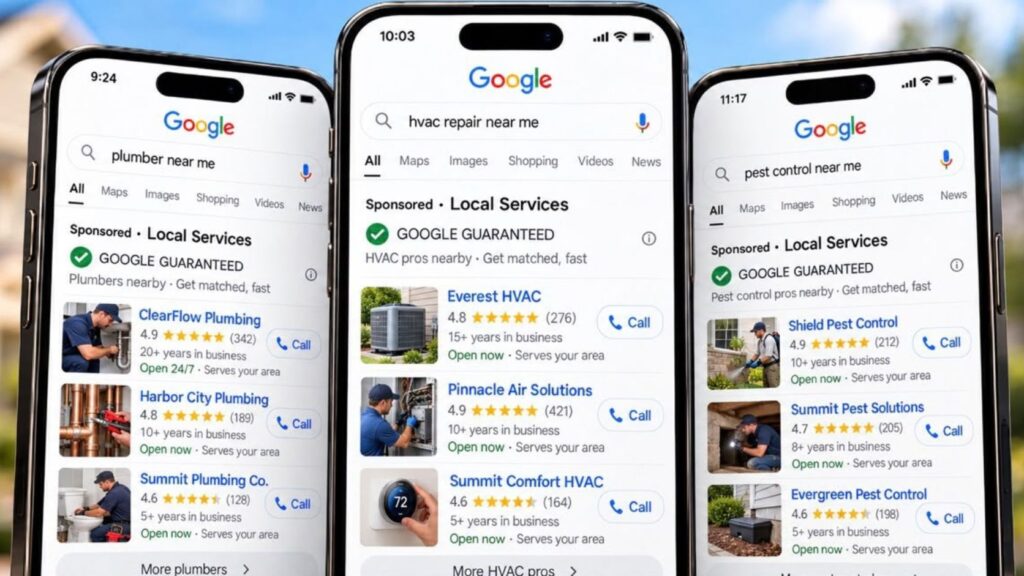
Google local service ads are pay-per-lead ads that put verified service businesses at the top of Google Search and Maps. In Canada, eligible trades pay per valid call or message, carry the Google Verified badge that replaced Google Guaranteed in October 2025, and get poor leads credited automatically [1][2][3].
In short: Local service ads put verified trades at the top of Google and charge you per lead, not per click. The rules changed in late 2025, so older advice about badges and disputing bad leads no longer matches how the program works in Canada.
Picture a Calgary furnace company with “Google Guaranteed” printed on the side of every van. That badge doesn’t exist anymore. On October 20, 2025, Google folded Google Guaranteed, Google Screened and License Verified by Google into one Google Verified badge, and retired the money-back guarantee that came with it [1][4].
A lot of the advice that still ranks for local service ads describes the old system. Every rule below is checked against Google’s own help pages and framed for Canadian trades, with dollar figures in CAD. The ads still show in a prominent spot on Google Search and Maps [5], so they’re worth getting right.
Here’s what’s covered, in order:
- What Google local service ads are and where they appear
- What the Google Verified badge means now
- Which trades qualify in Canada and how verification works
- What a lead costs and how ranking works
- How credits work for bad leads, and what changes for Canadian accounts in 2027
TL;DR
In short: The six points that matter most for Canadian trades running local service ads.
- Local service ads charge per valid lead, not per click, and show on Google Search and Maps [2][5]
- Google Guaranteed and Google Screened were retired on October 20, 2025. Every verified business now carries one Google Verified badge, with no Google money-back guarantee [1][4]
- Most home service trades qualify in Canada, but availability depends on category and location [6][7]
- Verification averages 3 to 4 weeks after you submit documents [8]
- There’s no manual dispute anymore. Google credits poor leads automatically, but never for areas or job types you don’t serve [3]
- Canadian accounts move into Google Ads in 2027, and manual bidding goes away [5]
One liner: The badge is the same for everyone now, so settings, speed, reviews and bids decide who wins the lead.
Key Dates and Numbers
In short: The dates and figures that shape how local service ads work in Canada right now.
| Fact | Figure | Source |
|---|---|---|
| Google Verified badge replaced the older badges | October 20, 2025 | Google, 2025 [4] |
| Last booking date covered by the money-back guarantee | December 7, 2025 | Google, 2025 [1] |
| Window to file a guarantee claim | 30 days after the job | Google, 2025 [1] |
| Average verification time | 3 to 4 weeks | Google, 2026 [8] |
| Home services on Google’s Canadian page | 36 | Google, 2026 [7] |
| Suggested minimum budget for Maximize Leads | About 10 leads a week | Google, 2026 [9] |
| Time for bidding to settle | About 2 weeks | Google, 2026 [9] |
| Time for an automatic credit to land | Usually within 30 days | Google, 2026 [3] |
| Canadian accounts move into Google Ads | 2027 | Google, 2026 [5] |
| Missed call threshold in Google’s advertiser notice | More than 20 seconds | Search Engine Land, 2026 [10] |
What Local Service Ads Are and Where They Show
In short: Local service ads are pay-per-lead ads for service businesses. They show on Google Search and Maps, and you’re charged when a real customer contacts you, not when someone clicks.
Local service ads are Google ads for service businesses that charge per lead instead of per click. They appear on Google Search and Google Maps, show your reviews and verification status, and let customers call, message or book you directly. You pay only when a valid lead comes in.
A lead is a real contact from a potential customer. Google counts it as valid when, for example, you answer a call and speak with the person, they leave a voicemail, or they send you a message or booking request [2]. Canadian trades get every contact type. Google says message leads and booking requests are only available in the United States and Canada [2].
You don’t pick keywords. Instead, you tell Google which services you offer and which areas you cover, and Google matches searches to your profile [5]. You also need a verified Google Business Profile behind the ad [8].
Here’s how that plays out. A homeowner in Bowness searches “furnace repair near me” on a cold January night. They see a short list of local profiles with star ratings and badges, tap yours, and call. That call is the lead you pay for. Someone who reads your profile and moves on costs you nothing.
Billing runs through Google Ads [2], but for now Canadian accounts manage their leads in a separate Local Services dashboard. That changes in 2027, and the details are further down.
Google Guaranteed Is Gone: What the Google Verified Badge Means in Canada
In short: Google retired the Google Guaranteed and Google Screened badges on October 20, 2025. Every verified business now carries the same Google Verified badge, and Google no longer reimburses customers for the work.
Google Guaranteed and Google Screened are retired. Since October 20, 2025, every business that passes Google’s checks carries the same Google Verified badge, and Google no longer reimburses customers for unsatisfactory work [1][4].
If your business was already verified, you didn’t have to do anything. Google moved existing advertisers to the new badge automatically, and new advertisers get it once every required check is complete [1].
| Before October 20, 2025 | Now | |
|---|---|---|
| Badge | Google Guaranteed, Google Screened or License Verified by Google | One Google Verified badge for every verified advertiser [1][4] |
| Customer money-back guarantee | Google could reimburse eligible customers | Discontinued [1] |
| What customers see | A green check badge | A blue badge, plus the specific checks the business passed [4][6] |
| Effect on ad ranking | Not applicable | The badge change doesn’t affect ranking [1] |
The guarantee had firm end dates. Customers could only request reimbursement for services booked through Local Services Ads before December 7, 2025, and had to file within 30 days of the job being finished [1].
What to Change in Your Own Marketing
“Google Guaranteed” on a truck wrap, yard sign or website now points to a program that has ended. If a customer asks about it, there’s no Google guarantee behind the job anymore. Swap the wording for “Google Verified”, or name the checks your profile shows, such as licence and insurance verification [6].
If the old guarantee was part of your sales pitch, replace it with one you control. A written workmanship warranty in your profile bio and on your website gives customers the same reassurance, and nobody can retire it but you.
Why the Badge Alone Won’t Set You Apart
Google says the badge change doesn’t affect ranking [1]. When every business in the results carries the same check mark, customers choose on other things: star rating, number of reviews, photos and how fast someone answers. Those are also the signals Google uses to order the ads [11]. So the work shifts from getting verified to running the account well, which is what the next sections cover.
Which Trades Qualify for Local Service Ads in Canada
In short: Most home service trades qualify in Canada, including HVAC, plumbing, electrical and roofing. Availability still depends on your category and location, so confirm with Google’s eligibility check before you plan a budget.
Google’s Canadian Local Services Ads page lists 36 home services as eligible for the Google Verified badge [7]. That’s a wide net, but being on the list doesn’t guarantee the ads run for your category in your area. Google sets availability by category and location, and its eligibility check with your business details is the final word [6].
| Trade group | Trades on Google’s Canadian list [7] | Extra screening Google notes [8] |
|---|---|---|
| Urgent repair | HVAC, plumber, electrician, garage door, locksmith | Background checks on service professionals as well as the owner. Garage door and locksmith also go through Advanced Verification. |
| Building and exterior | Roofing, siding, window repair, fencing, foundations, flooring, carpenter, painter, general contractor, handyman | Standard business and owner checks |
| Yard and property | Lawn care, landscaper, tree services, snow removal | Standard business and owner checks |
| Cleaning, removal and restoration | House cleaning, carpet cleaning, window cleaning, junk removal, moving services, pest control, appliance repair, water damage restoration | Water damage lists IICRC certification |
The page also names countertop, home inspector, home insulation, home security, home theater, pool, sewage and drain services [7].
Why Urgent Trades Face Extra Checks
When a furnace quits at minus 30 in a Calgary January, the homeowner is about to let a stranger into the house that night. Google treats HVAC, plumbing and electrical as urgent categories for that reason, and screens the technicians who show up, not only the owner [8]. The exact checks for your account appear during sign-up, so budget time for them.
If your trade isn’t on the list, Google Search ads still reach the same people looking for your services. And if you’re deciding how LSAs fit with SEO, your website and other channels, Marvel Marketing’s trades marketing work covers the full picture [12].
Getting Google Verified: Checks, Documents and Timeline
In short: Google checks your identity, background, business registration, insurance and licences before your ads can run. Google’s own average is 3 to 4 weeks after you submit documents, so start as soon as the account is open.
Every business has to pass Google’s screening before its local service ads go live, and passing it is what earns the Google Verified badge [7]. The checks vary by trade and province [13], but most Canadian trades will see some version of the ones below.
| Check | What Google looks at | What to have ready |
|---|---|---|
| Identity | The business owner, and field workers in some categories [8] | Photo ID for the owner |
| Background | The business and the owner. In urgent trades, the technicians too. The checks are run by third-party screening companies [8][13] | Details for the owner and each technician who’ll take jobs |
| Business registration | A business check and a business representative check, for select Canadian accounts [8] | Your provincial registration or incorporation documents |
| Insurance | General and professional liability. The type and minimum depend on category and location [8][13] | A current certificate of insurance |
| Licence | Business and owner licences at the provincial level, where local law requires them [8][13] | Trade certificates for the licensed work you do |
| Google Business Profile | A public, verified profile [8] | Owner or manager access to the profile |
Garage door and locksmith businesses also go through Advanced Verification. That can include a review of your Google Ads account, publicly available data about the business, and a video interview [8][13].
Google says the process takes 3 to 4 weeks on average once your documents are in, and recommends starting as soon as you create the account [8]. A simple way to avoid back-and-forth is to make sure your business name reads the same on your insurance certificate, your registration and your Google Business Profile.
What “Provincial Licence” Means in Alberta
Alberta lists electrician, plumber, Class A and Class B gasfitter, refrigeration and air conditioning mechanic, and appliance service technician among its compulsory certification trades. Restricted work in those trades must be done by a certified journeyperson, a registered apprentice under supervision, or someone holding a recognized trade certificate [14]. Those are the certificates to upload.
Roofing isn’t on Alberta’s compulsory list [14], so a Calgary roofer may have no provincial trade certificate to provide. That’s fine. Google only checks licences where local law requires them [8].
What a Local Service Ads Lead Costs in Canada
In short: There’s no fixed price for a local service ads lead in Canada. You pay per valid lead, and the price depends on your trade, location, lead type and bid. Google doesn’t publish Canadian averages, so judge a lead’s cost by what a booked job earns.
A bid is the most you’d pay for one lead. When similar local businesses bid on the same lead, those bids set what it’s worth, and you only pay when a lead comes in [9]. Google’s Canadian page has a budget calculator for a rough starting estimate [7].
| What moves your lead price | What Google says |
|---|---|
| Trade and job type | Prices vary by the job type and your location [2] |
| Lead type | Message leads are usually priced lower than phone leads [2] |
| Competition | Other businesses bidding on the same lead set its value [9] |
| Bidding mode | Your mode and bid limit change what you pay [2][9] |
| Profile quality | Higher quality profiles, including ones with photos, may pay lower costs per lead [11] |
How the Budget Works
You set an average weekly budget. Some weeks you’ll spend more than that, but never more than your monthly maximum, which is your weekly budget times the average number of weeks in a month [2]. A $500 CAD weekly budget works out to a monthly maximum of about $2,170.
There are three bidding modes. Maximize Leads lets Google set the bid, and it’s the one Google recommends, with a minimum budget of about 10 leads a week. Target cost per lead aims for an average price. Max per lead is a manual cap [9]. Whichever you pick, Google says results take about 2 weeks to settle while its model learns your business [9].
Raise the budget only when someone can answer the extra calls, because missed calls pull your ranking down [11] and may soon cost money too [10].
Judge the Lead by the Job
The numbers below are an illustration in Canadian dollars, not a quote.
| Furnace replacement | Drain clearing | |
|---|---|---|
| Example lead cost | $80 | $80 |
| Example share of leads that book | 1 in 4 | 1 in 2 |
| Ad cost per booked job | $320 | $160 |
| Example job value | $6,000 | $250 |
| Ad cost as a share of the job | About 5% | About 64% |
The same $80 lead is cheap for one job and a loss on the other. That’s why the job types you switch on matter as much as the bid. It’s also why setting bids by what each job earns, rather than chasing the lowest lead price, is where most of the return in a well-run account comes from.
Those ratios only mean something if you track them. Log which leads booked and what each job was worth, and you’ll know within a few months which job types to bid up and which to switch off.
How Google Ranks Local Service Ads
In short: Google runs an auction that weighs your bid together with how likely your ad is to produce a lead. Fast responses, relevant services, reviews and photos all count, so budget alone doesn’t buy the top spot.
Google orders local service ads through an auction that looks at your bid and your overall profile quality [11]. A bigger budget helps, but Google also scores how likely your ad is to turn into a real lead, and that’s the part most trades can improve.
| Factor Google names [11] | What you can do about it |
|---|---|
| Your bid | Use Maximize Leads unless you have a reason not to. Google says providers with equal quality and budgets who use it typically get more leads |
| Responsiveness | Answer calls during your listed hours. Google says missed calls can hurt this score |
| Relevance to the search | Switch on only the services you actually do, and name them in your business bio |
| Ways to reach you | Turn on message and booking leads so customers can reach you on nights and weekends |
| Profile quality | Ask for a review after every job, keep response times short, and add real photos of your work |
Completed verification checks also count toward profile quality [11], even though the badge itself looks the same on every profile.
Picture a Calgary plumber who’s under a sink most of the afternoon and lets a string of calls ring out. Each one is a customer lost. To Google, it’s also a sign the business is slow to respond, which pulls the ad down [11]. Forwarding calls to someone who can pick up, or turning on message leads, fixes both problems at once.
Two Things That Surprise Business Owners
Google balances results so every provider gets some chance to show, and it’s always running experiments [11]. Your position will move from one search to the next, so judge it over weeks, not by one search on your own phone.
If you run more than one location covering the same area, Google shows only your highest-ranking ad for a given search [11]. Two branches bidding on the same Calgary neighbourhoods won’t appear side by side.
How to Handle Bad Leads From Local Service Ads
In short: There’s no manual dispute process anymore. In Canada, Google reviews leads and credits poor ones automatically, but it won’t credit leads from outside your service area or for jobs you don’t do, so your settings are your real protection.
You can’t file a dispute on a local service ads lead anymore. Google now screens leads with its own models and credits poor ones automatically, and it no longer gives credits for “job type not serviced” or “geo not serviced” leads [3]. Automatic credits are available only in the United States and Canada [2], so Canadian trades are covered.
Here’s how it works. Leads are assessed when the customer first makes contact, and ones judged invalid or low quality are never charged. Charged leads get reassessed over time and may be credited later [3]. In most cases a credit reaches your account balance within 30 days, though the original charge still appears on your invoice [3].
| Situation | What happens |
|---|---|
| Spam or duplicate contact caught at first contact | Not charged [3] |
| Charged lead later judged low quality | May be credited automatically [3] |
| Lead you report in the Lead Feedback Survey | May occasionally be credited [2] |
| Customer outside your service area | Not credited [3] |
| A job type you don’t do | Not credited [3] |
| Valid lead outside your listed business hours | Not credited [2] |
| Customer only asking for advice or comparing prices | Not credited [2] |
| Customer cancelled or didn’t respond to your callback | Not credited [2] |
Take a Calgary roofer who meant to cover the city but left the service area loose. A lead comes in from Airdrie, a job they won’t drive to. Under the current rules there’s no credit for that [3]. The fix happens before the call: tighten the service area, switch off the job types you don’t do, and keep your listed hours honest.
Rate Every Lead Anyway
The Lead Feedback Survey still matters. Google uses it to send more of the leads you want, and it can trigger an occasional credit [2][3].
- Sign in to your Local Services Ads account and open Leads.
- Pick the lead and select Rate this lead.
- Open the survey and submit your feedback [3].
Your lead report shows each lead as not charged, charged, in review or credited, so you can see what Google has already caught [3].
What Changes Next for Canadian Local Service Ads Accounts
In short: Local service ads are moving into Google Ads as a new campaign type, and non-US accounts, including Canada, move in 2027. Google has also told advertisers that some missed calls will become billable, so call handling now affects your budget.
Google is folding local service ads into the main Google Ads platform as a Performance Max campaign type with pay-per-lead goals. US accounts started moving in August 2026, and non-US accounts, Canada included, are scheduled for 2027 [5]. Until then, Canadian trades sign up and manage leads through Local Services, and new pay-per-lead campaigns can’t yet be created inside Google Ads [5].
| Area | After the move to Google Ads [5] |
|---|---|
| Where you manage leads | Google Ads replaces the Local Services dashboard |
| Bidding | Manual bidding and per-category Target CPA are dropped |
| Budget | Your weekly budget becomes a daily average. Monthly spend is capped at that daily average times 30.4 |
| Reports | Old performance reports don’t carry over. Lead history does |
| Business details | Name, address and hours sync from your Google Business Profile |
| Verification | Your Google Verified status carries over, with no insurance or licence reverification |
The basics stay put. You still pay per valid lead, ads still show only on Google Search and Maps in the same positions, and targeting stays keywordless [5].
Three things to do before your account moves:
- Save or screenshot your local service ads reports, since they won’t transfer [5].
- Watch for Google’s email to your account admin. It arrives 14 days before your migration date, with a reminder 7 days later [5].
- If you bid with a manual max per lead, test Maximize Leads or Target CPL now, because manual bidding won’t make the move [5].
Missed Calls May Start Costing You
Google has also emailed Local Services advertisers about a billing change. Under the notice, a missed call during your business hours is charged as a valid lead if the caller stays on the line more than 20 seconds. Follow-up calls can also be charged when the first call didn’t qualify [10]. Notices reported so far give October 1, 2026 as the start date [10], but timing can vary by market, so check the notice in your own account. If callers go through a phone menu, the 20-second timer starts only after they press a key, and there’s no charge if they never press one [10].
Either way, answering fast now protects your budget as well as your ranking [11]. And once local service ads sit in the same Google Ads account as your Search campaigns, it makes sense to have one team run both. That’s how Marvel Marketing approaches Google Ads management for Calgary trades [15].
Running Local Service Ads Alongside Google Search Ads
In short: Local service ads win the “I need someone now” call, and Google Search ads win the customer who’s still comparing options. Most trades that qualify for both get the best coverage by running them together.
Local service ads and Google Search ads can both put you near the top of the results, but they do different jobs.
| Local service ads | Google Search ads | |
|---|---|---|
| You pay for | Valid leads, such as calls and messages [2] | Clicks on your ad [16] |
| Targeting | Your services and service areas, with no keywords [5] | Keywords and locations you choose |
| Where the customer lands | Your ad profile, then a call or message | Your website or a landing page |
| Who can run them | Eligible categories, after verification [6][7] | Most businesses |
| Wording | Google builds the listing from your profile | You write the ad copy |
Think about two searches in the same Calgary neighbourhood. A furnace that quits at 10 p.m. is a local service ads search. The homeowner wants someone verified who’ll pick up the phone right now. A homeowner comparing heat pump quotes for spring is doing research. A Search ad that sends them to a page with your pricing guide, reviews and financing options gives them what they need to decide, and a way to come back.
Search ads also cover the gaps. They reach people searching for services Google doesn’t offer through local service ads, and they’re the main paid option for trades that aren’t eligible at all. They’re also where you control the exact wording and the page a customer sees.
Run together, the two show up for the urgent call and for the planned project, and one budget conversation covers both. That’s how Marvel Marketing’s PPC services are set up for Calgary trades [17].
Local Service Ads Launch Checklist for Trades
In short: Check eligibility, get your documents together, keep your settings tight and answer fast. Those steps cover most of what separates a profitable account from an expensive one.
Before you sign up
- Confirm your trade and area with Google’s eligibility check [6]
- Gather owner ID, business registration, a current insurance certificate and any trade certificates your province requires [8][14]
- Make sure your Google Business Profile is verified and your business name matches your paperwork [8]
When you set up
- Switch on only the job types you do, and draw a service area you’ll actually drive to [3]
- List honest business hours [2]
- Start with Maximize Leads and give it about 2 weeks before judging results [9]
Once you’re running
- Answer calls fast and turn on message leads [11]
- Rate every lead in the Lead Feedback Survey, and save your reports before your account moves to Google Ads [5][3]
- Track which leads book and what each job earned
None of this is a one-time job. It’s the same routine a good LSA manager runs every week.
Local Service Ads FAQ
In short: Quick answers on badges, cost, bad leads, verification time, Calgary availability and the 2027 move to Google Ads.
Is Google Guaranteed still available in Canada?
No. Google retired the Google Guaranteed badge on October 20, 2025, and replaced it with a single Google Verified badge for every verified advertiser. The money-back guarantee that came with it was discontinued too, so no Google guarantee stands behind a job booked through local service ads today [1][4].
What happened to Google Screened?
Google Screened was retired on the same date as Google Guaranteed, October 20, 2025, along with License Verified by Google. All three became one Google Verified badge. Businesses that were already verified moved to the new badge automatically, and profiles now list the specific checks each business passed [1][4][6].
How much do local service ads cost in Canada?
There’s no fixed price. You pay for each valid lead, and the price depends on your trade, location, lead type and bid, with message leads usually priced lower than calls. You set an average weekly budget, and Google never charges more than your monthly maximum [2][9].
Can you dispute a bad Google LSA lead?
Not manually. In Canada, Google reviews leads and credits poor ones automatically, usually within 30 days. It won’t credit leads for job types you don’t do or areas you don’t serve, so tight settings are your main protection. Rating each lead in the Lead Feedback Survey can occasionally earn a credit [2][3].
How long does it take to get Google Verified?
Google says screening and verification take 3 to 4 weeks on average after you submit your documents. Checks can include identity, background, business registration, insurance and provincial licences, depending on your trade. Start as soon as you open the account, and make sure your paperwork and Google Business Profile match [8].
Are local service ads available in Calgary?
Yes, for eligible trades. Google’s Canadian page lists 36 home services, including HVAC, plumbing, electrical and roofing. Availability is set by category and location, so run Google’s eligibility check with your Calgary business address before planning a budget. Urgent trades such as HVAC and plumbing also face extra background checks [8][6][7].
When do Canadian LSA accounts move to Google Ads?
In 2027. Google is moving local service ads into Google Ads as a Performance Max campaign type with pay-per-lead goals, starting with US accounts in August 2026. Canadian accounts follow in 2027. Pay per lead, Search and Maps placements and keywordless targeting stay the same, but old reports don’t transfer [5].
Local Service Ads Glossary
In short: Plain definitions of the terms used above.
| Term | What it means |
|---|---|
| Local Services Ads | Google’s pay-per-lead ads for service businesses, shown on Google Search and Maps [5][2] |
| Valid lead | A real contact from a potential customer, such as an answered call, a voicemail, a message or a booking request [2] |
| Google Verified badge | The single badge every business earns after passing Google’s screening. It replaced Google Guaranteed and Google Screened in October 2025 [1][4] |
| Lead credit | Money Google returns to your balance when it later judges a charged lead to be low quality [3] |
| Lead Feedback Survey | The rating form for each lead. It shapes the leads Google sends you and can occasionally earn a credit [2][3] |
| Maximize Leads | Google’s recommended bidding mode, where Google sets bids to get the most leads for your budget [9] |
| Target cost per lead | A bidding mode where you set the average price you aim to pay per lead [9] |
| Performance Max with pay-per-lead goals | The Google Ads campaign type local service ads move into. Canadian accounts move in 2027 [5] |
| Advanced Verification | Extra screening for some categories, such as garage door and locksmith. It can include a review of the business’s Google Ads account, public data and a video interview [13][8] |
| Compulsory certification trade | In Alberta, a trade where restricted work must be done by a certified journeyperson, a registered apprentice or someone holding a recognized trade certificate [14] |
Local Service Ads at a Glance
In short: The key facts about the badge, the program in Canada and lead credits, in one place.
Google Verified Badge
| Property | Value |
|---|---|
| Launched | October 20, 2025 [4] |
| Replaced | Google Guaranteed, Google Screened, License Verified by Google [1] |
| Money-back guarantee | Discontinued. Claims covered services booked before December 7, 2025 [1] |
| Shown | On the local service ads profile, with the checks passed [1][6] |
| Ranking effect | None from the badge change itself [1] |
Local Service Ads in Canada
| Property | Value |
|---|---|
| Pricing | Pay per valid lead [2] |
| Lead types | Calls, messages and bookings. Messages and bookings are US and Canada only [2] |
| Automatic credits | Available in the US and Canada [2] |
| Verification time | 3 to 4 weeks on average [8] |
| Move to Google Ads | 2027 for non-US accounts [5] |
Automated Lead Credits
| Property | Value |
|---|---|
| How it works | Model-based review at first contact and afterward [3] |
| Timing | Usually within 30 days [3] |
| Not credited | Areas you don’t serve, job types you don’t do, leads outside business hours, and more [2][3] |
| Your input | The Lead Feedback Survey [3] |
Get Local Service Ads Working for Your Trade
In short: The next step is a short intro call.
The Google Verified badge now looks the same on every profile, so the trades that win are the ones with tight settings, fast answers, steady reviews and bids set by what each job earns. With local service ads moving into Google Ads in 2027, it also makes sense to plan them alongside your Search campaigns now.
If you’d like a second set of eyes on your account, or help getting verified, book an introduction call with Marvel Marketing [18]. You can also read how the team handles Google Ads management for Calgary trades [15].
Sources
- Google Local Services Help: About Google Verified badge: https://support.google.com/localservices/answer/16498018
- Google Local Services Help: How leads work: https://support.google.com/localservices/answer/7195435
- Google Local Services Help: About Automated Local Services Ads lead credits: https://support.google.com/localservices/answer/15100654
- Google Business Profile Community: Upcoming Changes to Local Services Ads Google Guarantee Badges: https://support.google.com/business/community-guide/366556199/upcoming-changes-to-local-services-ads-google-guarantee-badges?hl=en
- Google Ads Help: Local Services Ads transition to Performance Max campaigns with pay-per-lead goals: https://support.google.com/google-ads/answer/17213585
- Google Local Services Help: Getting started with Local Services Ads: https://support.google.com/localservices/answer/6224841
- Google Business (Canada): Local Services Ads: https://business.google.com/ca-en/ad-solutions/local-service-ads/
- Google Local Services Help: Business screening and verification requirements: https://support.google.com/localservices/answer/12174778
- Google Local Services Help: How bidding works for Local Services Ads: https://support.google.com/localservices/answer/10125017
- Search Engine Land: Google Local Services Ads will charge for some missed calls starting Oct. 1: https://searchengineland.com/google-local-services-ads-will-charge-for-some-missed-calls-starting-oct-1-485798
- Google Local Services Help: About ad rankings: https://support.google.com/localservices/answer/7527305
- Marvel Marketing: Home Services Marketing Agency: https://marvelmarketing.ca/construction-and-trades-marketing/
- Google Local Services Help: How providers qualify for Local Services Ads: https://support.google.com/localservices/answer/6230381
- Government of Alberta, Tradesecrets: Compulsory Certification Trades: https://tradesecrets.alberta.ca/trades-in-alberta/compulsory-certification-trades
- Marvel Marketing: Calgary Google Ads Management: https://marvelmarketing.ca/calgary-google-ads-management/
- Google Ads Help: Cost-per-click (CPC): Definition: https://support.google.com/google-ads/answer/116495
- Marvel Marketing: Calgary PPC Services: https://marvelmarketing.ca/calgary-ppc-services/
- Marvel Marketing: Book an Introduction Call: https://marvelmarketing.ca/book-intro-call/